

Bitgrain UX Audit: No Cloud Save, Tiny Template Previews
This is a short, self-directed teardown of Bitgrain — a publicly available product we picked ourselves, not a commissioned client audit.
Bitgrain is a browser-based design tool that positions itself against Figma, Canva, and Adobe Express: a “studio” layered-canvas editor, a “video editor,” and a “darkroom” image tool, all launched from one dashboard.
Onix scoped this teardown as a “Growth UX Audit,” built around one line from the report itself: “Optimizing Bitgrain for Activation, Engagement & Retention.” Below are the five findings, in the order the report presented them.
Problem 01
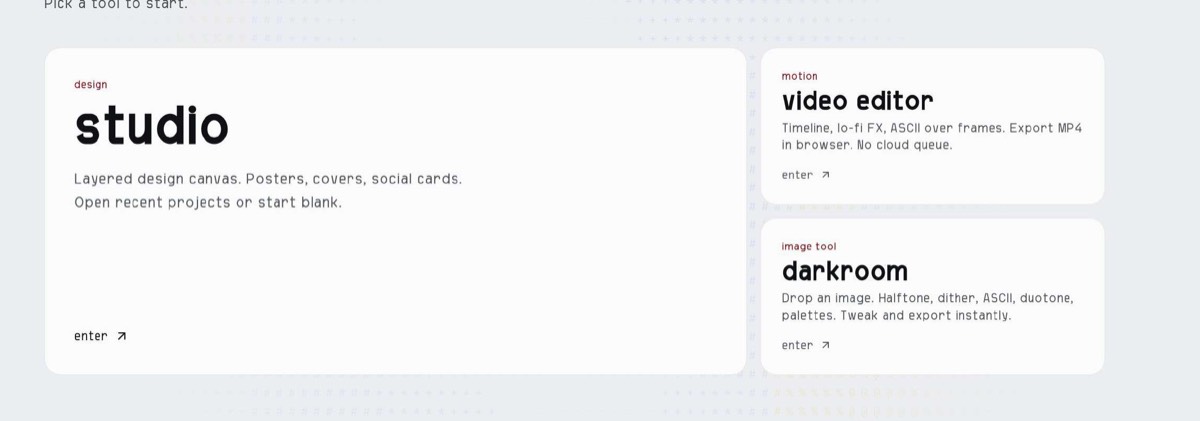
There is no “My Projects” folder to save projects online, only locally as a file on the computer.
Why it matters
Users are used to a modern user experience like Figma or Canva, where projects save automatically. If users close the app without saving locally, they lose all their hard work and get frustrated.
Improvement
Adding a “My Projects” folder on the dashboard with auto-save would fix this and keep users’ progress safe every time they return.
Business impact
- Increased User Retention & LTV: Eliminating accidental data loss removes the #1 cause of rage-quitting. Users who trust that their work is safe build habits, log in more frequently, and stay subscribed longer.
- Higher Conversion to Paid Plans: Cloud storage and project management serve as natural feature gates for SaaS monetization (e.g., offering a free limit of 3 projects, then upselling unlimited storage or team folders).
Problem 02
The interface fonts look stylish and match the landing page branding, but readability becomes an issue when using the app on a daily basis.
Why it matters
Typography directly impacts user efficiency, product adoption, and user retention. When brand aesthetics compromise usability in everyday software, it creates long-term business friction.
Improvement
Keep the stylish display font strictly for marketing pages and large headings, while switching the core app interface to a clean, highly legible system font for everyday tasks.
Business impact
- Reduces Cognitive Load & Eye Fatigue: Display fonts designed for high-impact marketing (like landing pages) slow down reading speed. In a daily-use app, poor legibility forces the brain to work harder to parse basic information, causing mental fatigue.
- Prevents Daily Usage Friction: Marketing copy is meant to be scanned once, but app UI is scanned thousands of times. If reading feels effortful, users sub-consciously resist opening the tool for routine tasks.
- Accelerates Task Completion Speed: Clear, highly legibile UI fonts allow power users to recognize actions, labels, and data instantly, drastically lowering time-to-value for daily workflows.
Problem 03
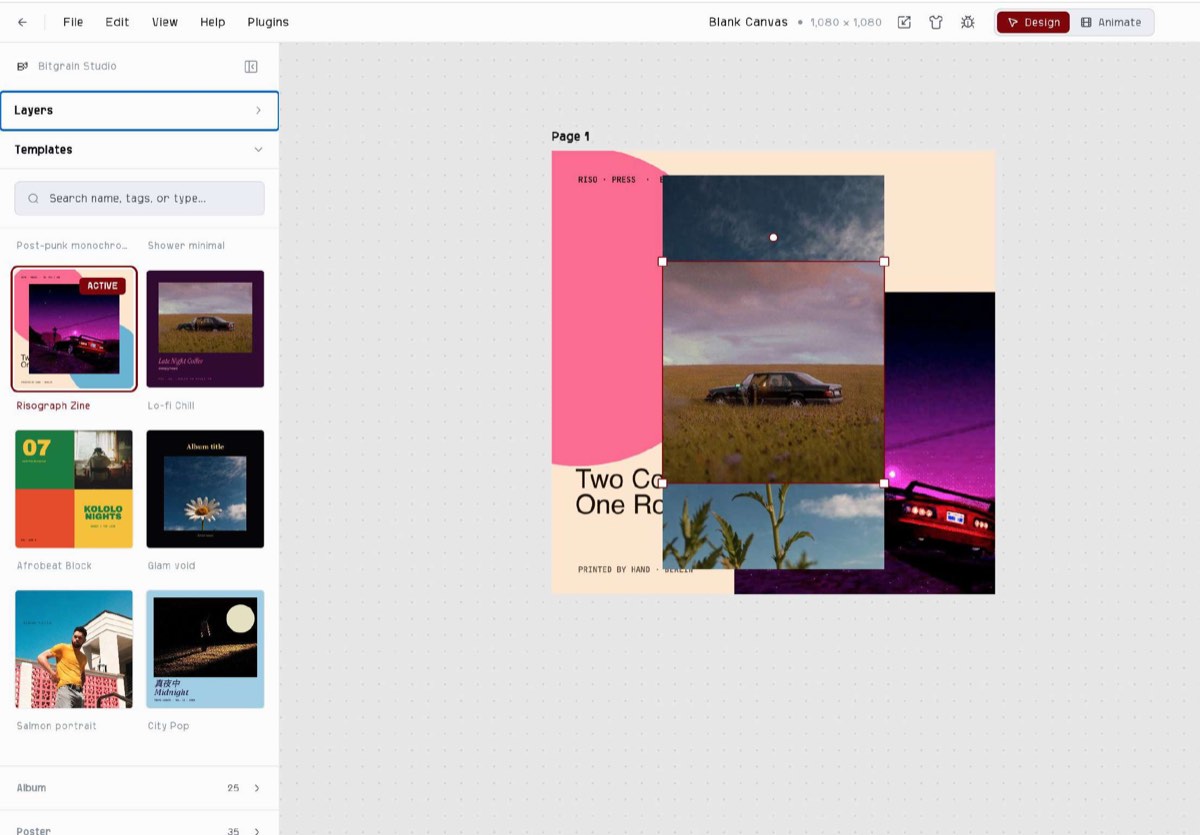
It is impossible to work with multiple templates within a single project, however, the service does allow you to duplicate a template and create design variations based on that single template.
Why it matters
Creative users love experimenting with different variations. If they can already duplicate artboards, why not let them play around with different templates within the same project?
Improvement
Allow users to add a new page or artboard within an existing project and apply any template directly to that specific page via a side panel/library.
Business impact
- Higher Power-User Retention: Marketers and agencies run multi-asset campaigns (e.g., social ads, banners, stories). Allowing them to build full campaigns in one workspace makes your tool essential to their core workflow.
- Increased In-App Engagement & Time-Spent: Giving creators the freedom to experiment and mix layouts within a single file keeps them working inside your platform longer, deepening product adoption.
- Stronger Competitive Positioning: Modern design suites (Figma, Canva, Adobe Express) treat multi-page, multi-template workspaces as a baseline feature. Adding this removes a key deal-breaker during software evaluation.
Problem 04
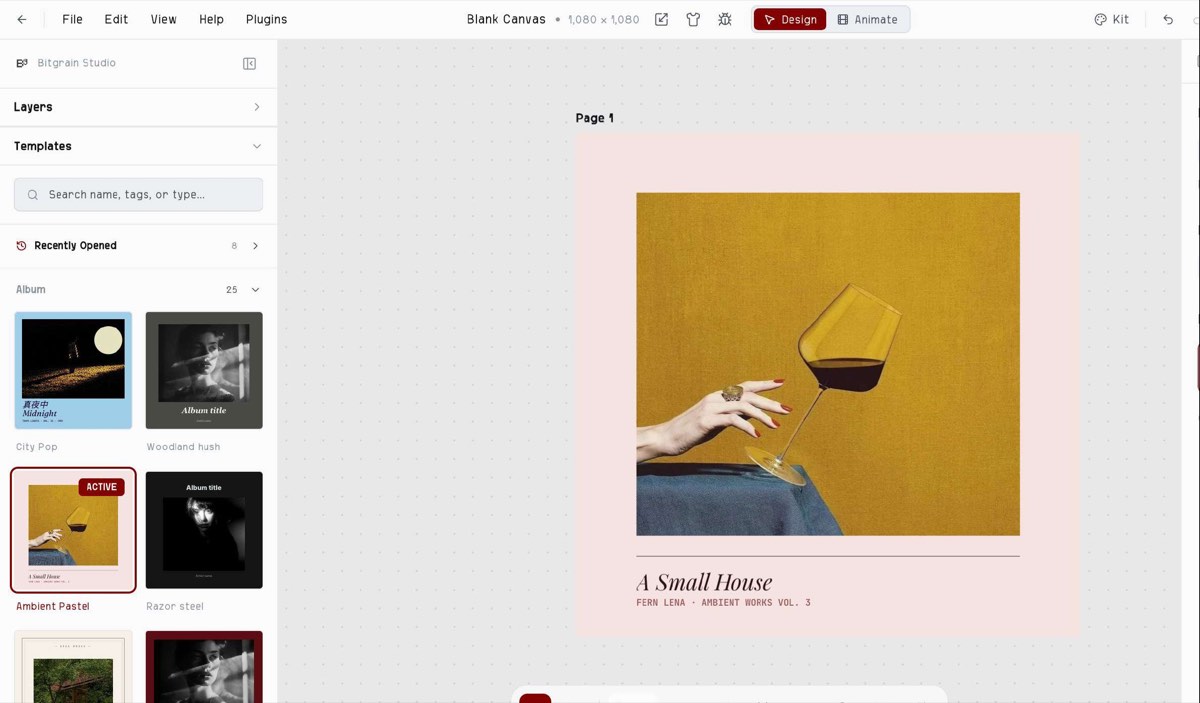
The 2-column grid makes artwork previews very small. Users can barely see key design details, text layouts, or textures without applying the template first.
Why it matters
High-quality, visible previews make the asset library feel premium and expansive. Tiny, indistinguishable thumbnails make the platform’s content feel cheap or generic.
Improvement
Switch the left sidebar from a tight 2-column grid to a single, wide column (1-column feed) or Scale thumbnail sizes so the layout details occupy max visual space.
Business impact
- Faster Time-to-Value (TTV): Clear previews allow creators to find the exact right design in seconds rather than trial-and-error clicks, accelerating the path to project completion.
- Higher First-Session Activation: New users evaluate design tools by their content quality. High-resolution thumbnails showcase the true value of your asset library, preventing early drop-offs.
- Increased Feature & Asset Utilization: Users discover and engage with a wider variety of premium templates when details (fonts, compositions, imagery) are visible at a glance.
Problem 05
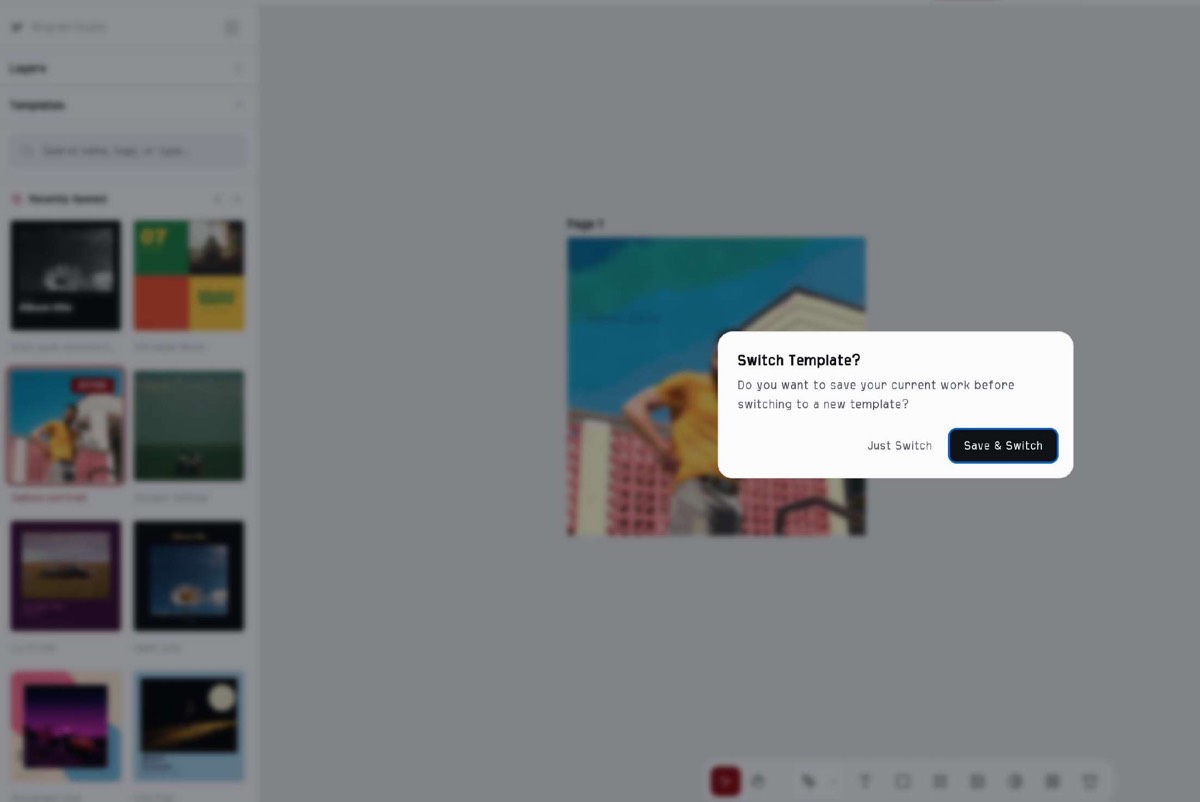
When selecting a template, the app repeatedly asks if you want to save changes, even when no edits have been made.
Why it matters
When a creative user is browsing templates, these constant interruptions disrupt their flow and cause frustration, which can ultimately lead to them off the platform.
Improvement
Trigger the save prompt only if actual modifications (e.g., text edits, layer changes, color updates)
Business impact
- Reduced Onboarding Churn: New users exploring templates to see what the tool can do won’t get annoyed and exit during their very first session.
- Higher Session Duration & Engagement: A seamless browsing flow lets creators test dozens of templates effortlessly, increasing the likelihood that they’ll find one they like and finish a project.
- Lower Customer Frustration (NPS Impact): Removing repetitive “false alarm” popups fixes a major UX flaw, boosting user satisfaction scores (NPS/CSAT) and preventing negative reviews about clunky software.
Executive summary
This analysis evaluates key user experience bottlenecks across the web platform and design editor, outlining strategic fixes to increase user activation, engagement, and paid conversions.
Key opportunities
- Implement “My Projects” & Auto-Save — Launch a centralized “My Projects” dashboard with seamless background auto-saving to protect user progress and drive long-term retention.
- Streamline Template Discovery — Upgrade the template sidebar to a wider 1-column layout with instant hover previews, quick-apply overlays, and state-tracking (“dirty flags”) to suppress false save prompts.
- Enable Multi-Template Workspaces — Allow creators to insert, swap, and combine multiple template artboards within a single project workspace.
- Refine Interface Legibility — Standardize system UI typography using clean sans-serif fonts for controls and fix panel layout bugs to improve overall platform quality.
Want this for your own product?
This is a short, self-directed teardown of a publicly available product. We picked Bitgrain ourselves to review — we weren't hired to audit it, and it isn't a client of ours. A commissioned UX audit goes further: it's scoped to your product's own goals and flows, not just what's visible to an outside visitor.
Want the same kind of review for your own product? See our website UX audit page for what's included, or browse more examples to see other teardowns.