

brag.fast UX Audit: A Metaphor New Users Can't Decode
This is a short, self-directed teardown of brag.fast — a publicly available product we picked ourselves, not a commissioned client audit.
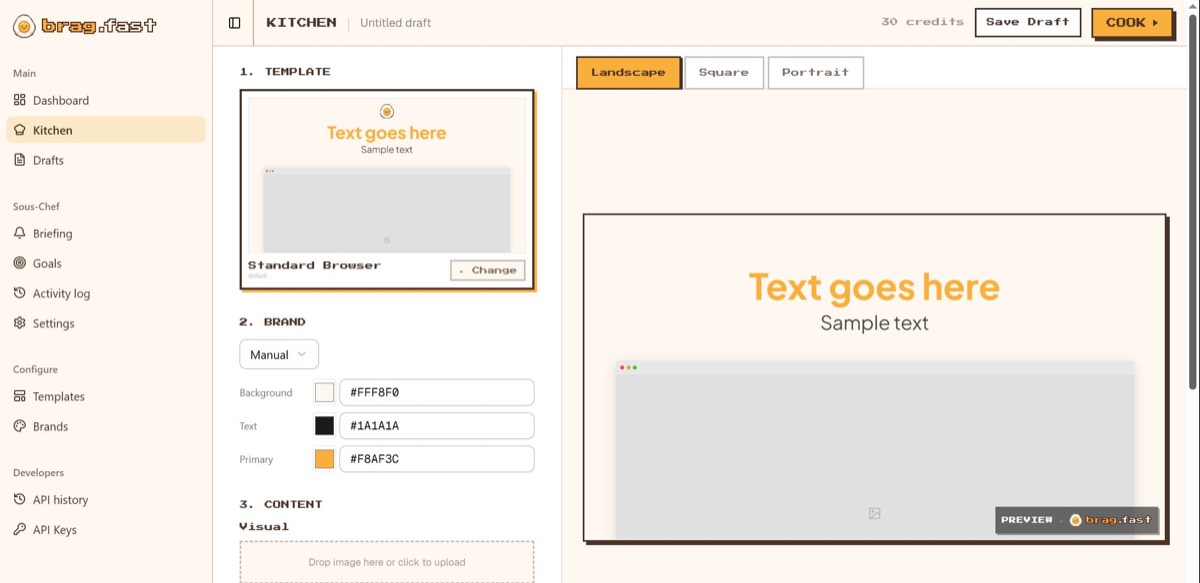
brag.fast is a web AI content-generation tool built around a “Kitchen / Sous-Chef / Cook” cooking metaphor: pick a template in the Kitchen, configure brand colors and visuals, and “Cook” it into a finished piece of content billed against a credit balance.
Onix labeled this one an “Onboarding & Consistency UX Audit,” hung on a single line pulled from the report itself: “Turning a Clever Concept Into an Intuitive Product.” Below are the three findings, in the order the report presented them.
Problem 01
The “Kitchen,” “Sous-Chef,” and “Cook” metaphor drives navigation with no onboarding to explain what it means.
Why it matters
New users must decode branded vocabulary before they can even find the task they came to do, adding friction right when it matters most.
Improvement
Add lightweight first-run onboarding that translates the metaphor into plain functional terms (e.g., “Kitchen — where you create content,” “Sous-Chef — your content strategy tools”), or reduce reliance on the metaphor in navigation labels and reserve it for brand voice/marketing.
Business impact
- Reduces time-to-first-action for new users
- Lowers abandonment during the critical first session
- Preserves the brand personality without it costing usability
Problem 02
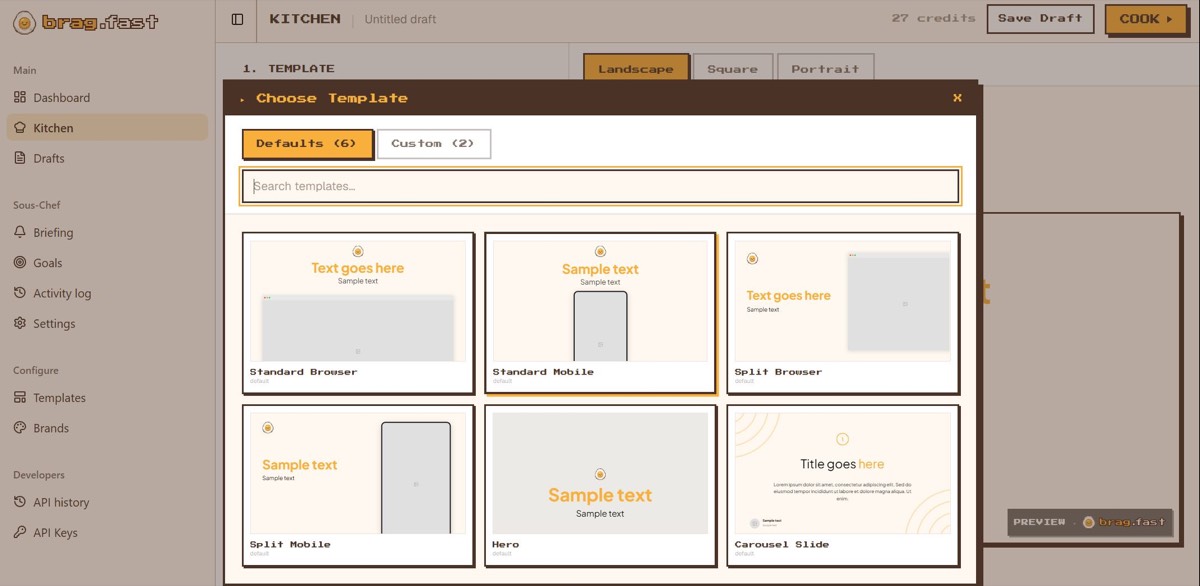
Switching templates clears all information the user has already entered: brand colors, uploaded visuals, and text, with no warning or save prompt beforehand.
Why it matters
Punishes normal exploration with data loss, turning template comparison into a costly mistake.
Improvement
Persist entered content (brand settings, uploaded visuals, text) independently of template selection, or at minimum show a confirmation dialog before a destructive switch, with an option to preserve prior inputs.
Business impact
- Removes a direct, high-frustration point of task failure
- Increases completion rate for first content pieces
- Reduces the single most damaging “I’m done with this tool” moment in the flow
Problem 03
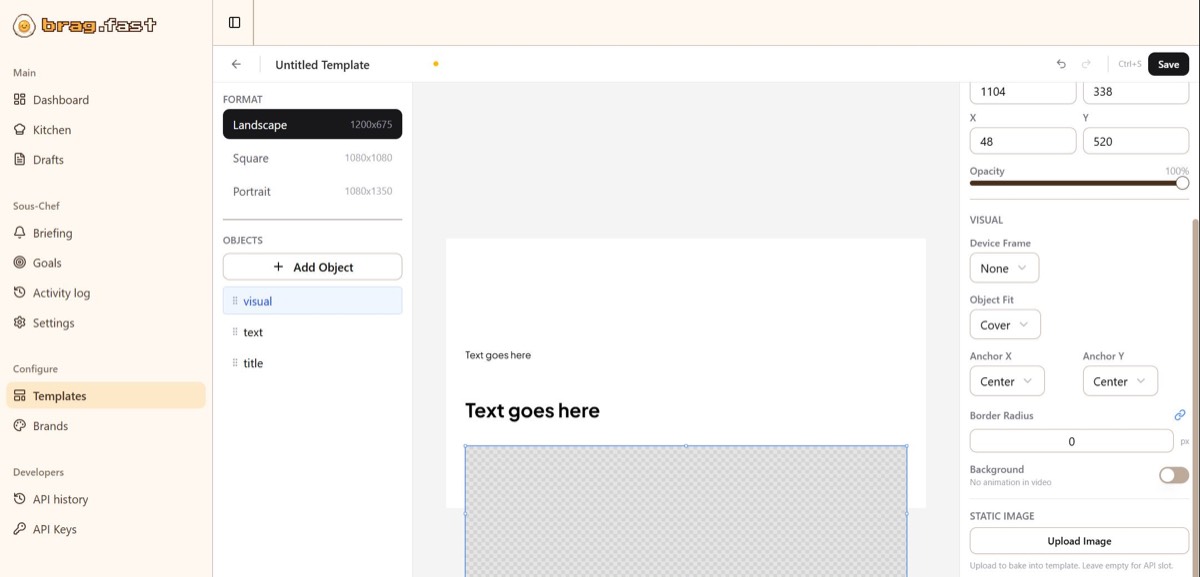
Visual upload works differently in Kitchen vs. the Templates builder, different location, different UI.
Why it matters
Users can’t carry learned behavior across the product, so it feels like two disconnected tools.
Improvement
Standardize the interaction pattern and placement for shared actions (uploading visuals, setting brand colors, editing text) across both the guided Kitchen flow and the freeform Templates builder, even if the surrounding context differs.
Business impact
- Shortens the learning curve after the first successful task
- Reduces the sense of complexity that drives users to abandon mid-session
- Makes the product feel unified rather than assembled from separate builders
Executive summary
brag.fast has a distinctive, memorable brand voice and a genuinely capable content-generation tool underneath it — but right now, the product asks new users to learn a metaphor, tolerate data loss, and re-learn its own interface twice before they can complete a single task.
Key opportunities
- Make the metaphor learnable — Add onboarding that translates “Kitchen,” “Sous-Chef,” and “Cook” into plain functional meaning.
- Unify the interaction model — Standardize how core actions like visual upload work across Kitchen and Templates.
- Stop punishing exploration — Persist user input across template switches instead of discarding it.
- Make cost part of the decision — Show credit cost before generation, not after.
Want this for your own product?
This is a short, self-directed teardown of a publicly available product. We picked brag.fast ourselves to review — we weren't hired to audit it, and it isn't a client of ours. A commissioned UX audit goes further: it's scoped to your product's own goals and flows, not just what's visible to an outside visitor.
Want the same kind of review for your own product? See our website UX audit page for what's included, or browse more examples to see other teardowns.