

ChatPal UX Audit: No Guidance at the Moments That Matter
This is a short, self-directed teardown of ChatPal — a publicly available product we picked ourselves, not a commissioned client audit.
ChatPal is a mobile AI language-learning chatbot app (“Nora Chat”) with lesson tracking, custom practice scenarios, and a Pro subscription.
This one was scoped as a “Growth UX Audit,” taking its cue from a line in the report itself: “ChatPal has a strong learning foundation, but key moments in the journey do not consistently guide users toward the next valuable action.” Five findings follow below, presented in the order the report gave them.
Problem 01
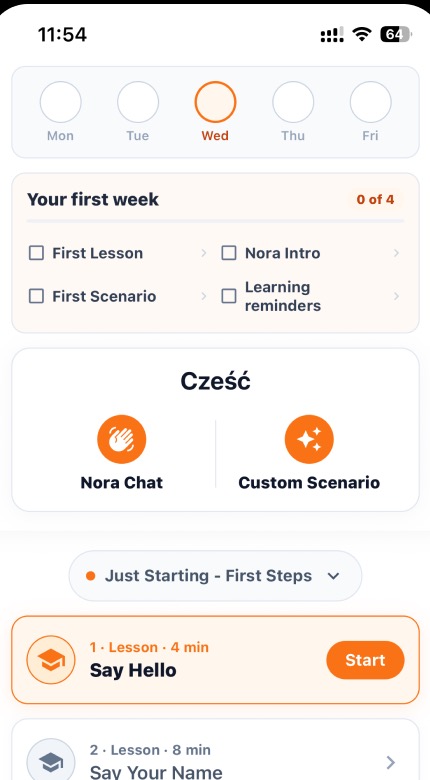
The “Cześć” section presents two buttons — “Nora Chat” and “Custom Scenario” — with no description, subtitle, or context. A first-time user has no idea what these do, who Nora is, or what a “Custom Scenario” involves.
Why it matters
These are key product features, but their purpose isn’t clear. Users may not understand why they should tap them, reducing adoption of the app’s most valuable capabilities.
Improvement
Add a brief subtitle beneath each button: e.g., “Practice conversation with your AI tutor” under Nora Chat, “Create your own real-life practice situation” under Custom Scenario. Consider a first-visit tooltip or a short animated preview showing what the experience looks like.
Business impact
If AI conversation is one of the key features, users need to discover and understand it easily. Better visibility could increase feature usage and Pro conversions.
Problem 02
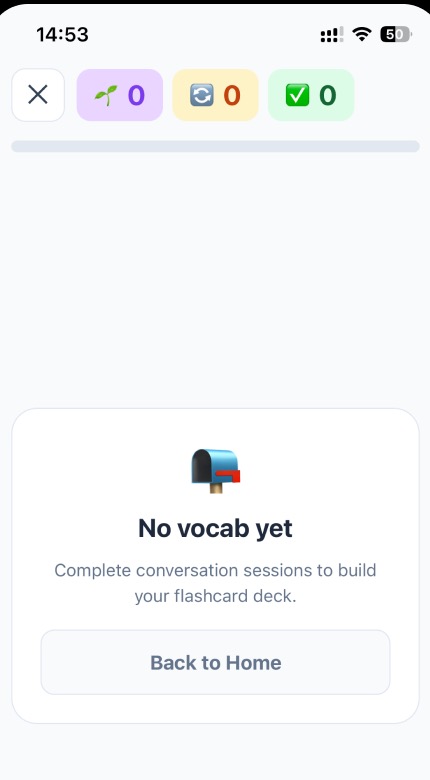
The empty state says “No vocab yet…” with only a “Back to Home” button. It doesn’t explain which activities generate flashcards, how many to expect, or create any motivation to start.
Why it matters
Empty states are key activation moments. This one feels like a dead end and doesn’t give users a clear next step.
Improvement
Replace “Back to Home” with a direct CTA like “Start your first lesson” that links to the next available lesson. Add a brief explanation: “Every conversation you have creates flashcards automatically. Complete your first lesson to unlock your first words.”
Business impact
A well-designed empty state converts curiosity into action. Directing users to a specific lesson rather than a generic “back” significantly increases activation rates and reduces time-to-first-value.
Problem 03
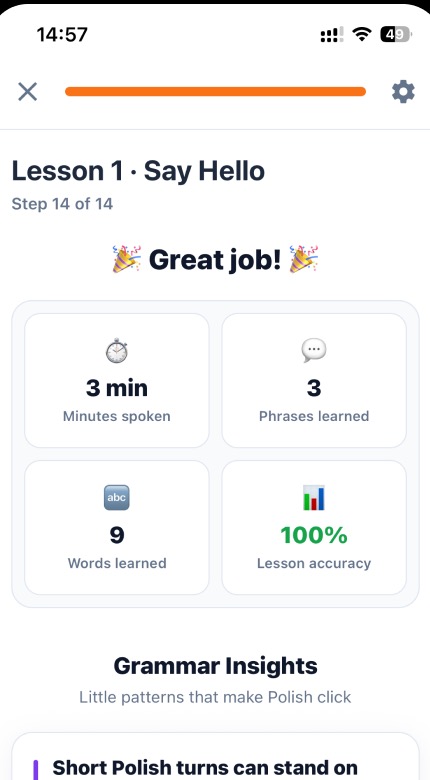
After completing a lesson with excellent stats the only CTA is “Home.” There’s no prompt to continue to the next lesson, review flashcards for words just learned, or try Nora Chat to practice conversationally.
Why it matters
The completion moment is when users are most motivated to keep going. Sending them back to Home breaks this momentum and makes them decide what to do next. This can lead to drop-off.
Improvement
Add a primary CTA: “Go to next leson”, “Practice these words with Nora” or “Review flashcards.” Keep “Home” as a tertiary text link.
Business impact
Post-completion CTAs can keep users engaged and encourage them to continue learning. This can increase lessons per session and overall engagement.
Problem 04
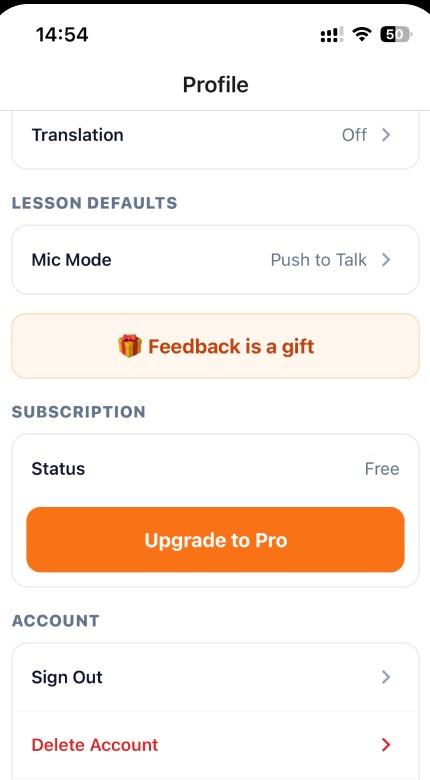
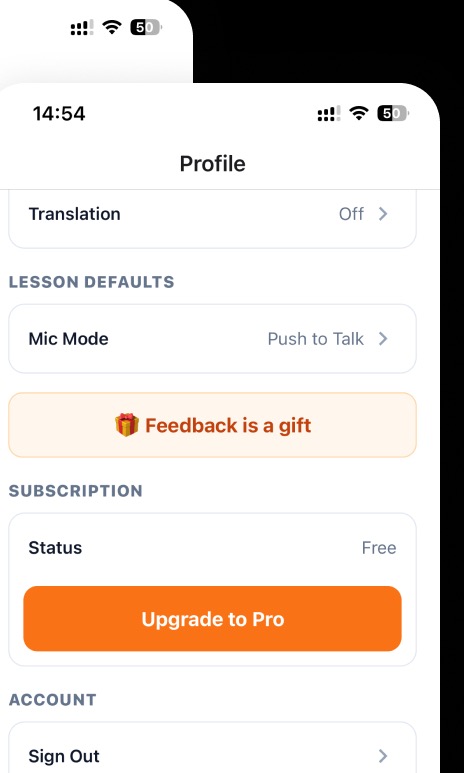
The “Feedback is a gift” banner feels unclear and out of context. Users may not understand what it does, why they should interact with it, or what kind of feedback is expected.
Why it matters
Ambiguous CTAs get ignored. If this is meant to collect user feedback, it needs to communicate the value exchange clearly. Its placement between settings and subscription creates visual noise in an already dense settings page.
Improvement
Clarify the purpose: “Help us improve ChatPal — Share your thoughts (2 min)”. Move it to a more contextual moment — e.g., after completing a lesson or after a week of use, when users have informed opinions. Or surface it through a less intrusive mechanism like an in-app survey prompt.
Business impact
Clear and well-timed feedback requests can get better responses. If the request feels unclear or out of place, users may start ignoring similar messages.
Problem 05
The empty state says “No vocab yet…” with only a “Back to Home” button. It doesn’t explain which activities generate flashcards, how many to expect, or create any motivation to start.
Why it matters
Users can’t make an informed purchasing decision without understanding the value exchange. A generic upgrade button with no context creates zero desire. The placement in settings means only users actively looking for subscription info will find it — which is a tiny fraction of the user base.
Improvement
Create a dedicated Pro features screen accessible from the upgrade button that clearly lists what users get: unlimited lessons, advanced scenarios, offline access, etc. Surface upgrade prompts at natural friction points (e.g., after completing a lesson) rather than only in settings. Show pricing upfront.
Business impact
This is likely the most impactful revenue issue. A buried, context-free upgrade CTA severely limits trial-to-paid conversion. Strategic paywall placement at moments of demonstrated value can dramatically increase conversion rates.
Executive summary
ChatPal has a strong learning foundation, but key moments in the journey do not consistently guide users toward the next valuable action.
Key opportunities
- Clarify core feature value — Help users understand what Nora Chat and Custom Scenarios enable before they choose.
- Guide users to the next action — Use empty and completion states to direct users into a lesson, vocabulary review, or conversation practice.
- Make feedback requests purposeful — Ask for feedback when users have enough experience to respond—and clearly explain why it matters.
- Create a clearer upgrade journey — Show Pro benefits, pricing, and upgrade prompts at moments when users have experienced product value.
Want this for your own product?
This is a short, self-directed teardown of a publicly available product. We picked ChatPal ourselves to review — we weren't hired to audit it, and it isn't a client of ours. A commissioned UX audit goes further: it's scoped to your product's own goals and flows, not just what's visible to an outside visitor.
Want the same kind of review for your own product? See our mobile app UX audit page for what's included, or browse more examples to see other teardowns.