

iArt.ai UX Audit: Uncertain Generation and Hidden Limits
This is a short, self-directed teardown of iArt.ai — a publicly available product we picked ourselves, not a commissioned client audit.
iArt.ai is a web AI video-generation tool — “Turn anything into video” — with promo, explainer, and post templates and a referral-credits system.
This teardown was scoped by Onix as a “Growth UX Audit,” centered on the report’s own framing: “iArt.ai has a powerful AI creation engine, but the current experience introduces friction at three critical moments: generation, export, and returning to existing work. These issues can make the product feel less predictable and less efficient, particularly for users creating content repeatedly.” The three findings below follow the report’s own sequence.
Problem 01
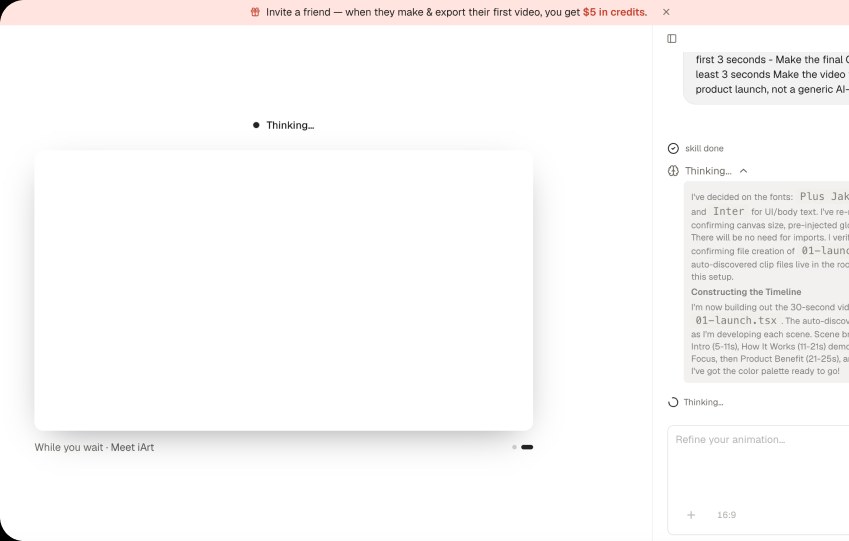
During generation, the interface shows states such as “Thinking…”, “Thought for 1 seconds”, and individual completed skills. The user can see that the system is doing something, but the experience doesn’t clearly communicate what is happening.
Why it matters
AI generation already involves uncertainty. When progress feedback focuses on internal AI activity rather than meaningful user outcomes, users can perceive the process as slow.
Improvement
Turn generation into a clearer progress journey. Show meaningful progress, estimated remaining time where possible, what has already been created, and clear next step after generation.
Business impact
A more reassuring generation experience can improve completion rates and perceived product reliability, reducing abandonment during one of the most critical moments between activation and the user’s first successful output.
Problem 02
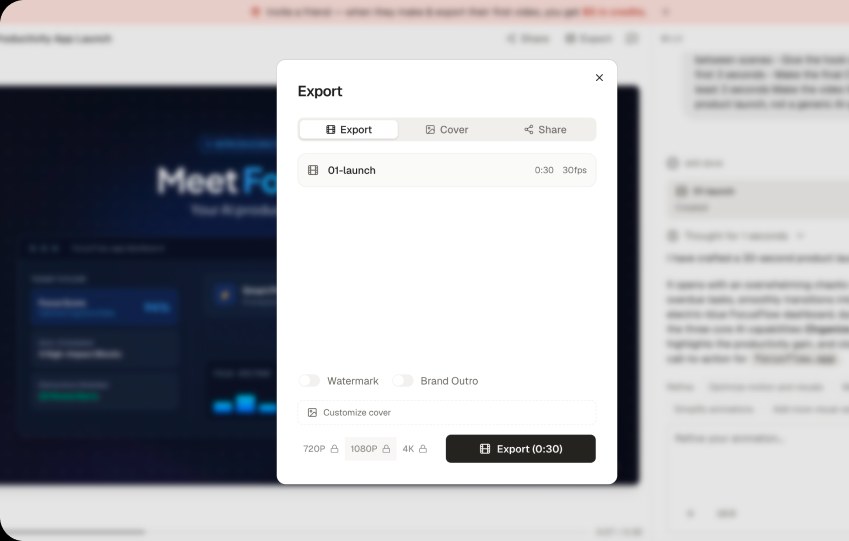
The user can create and refine a video without seeing clear information about the available export options. Only when they open Export do they encounter locked options such as 1080p and 4K.
Why it matters
Export is the moment when users expect to complete their task. Discovering limitations at this point can create frustration and make the product feel less predictable — especially if the user expected the generated video to be ready to use.
Improvement
Make export capabilities and limitations visible earlier in the creation journey:
- Indicate the available export quality before generation.
- Clearly distinguish what is available vs. locked.
Business impact
Greater transparency can reduce last-step frustration and create a more predictable path from creation → export → upgrade, potentially improving conversion while reducing abandonment at the most valuable point of the journey.
Problem 03
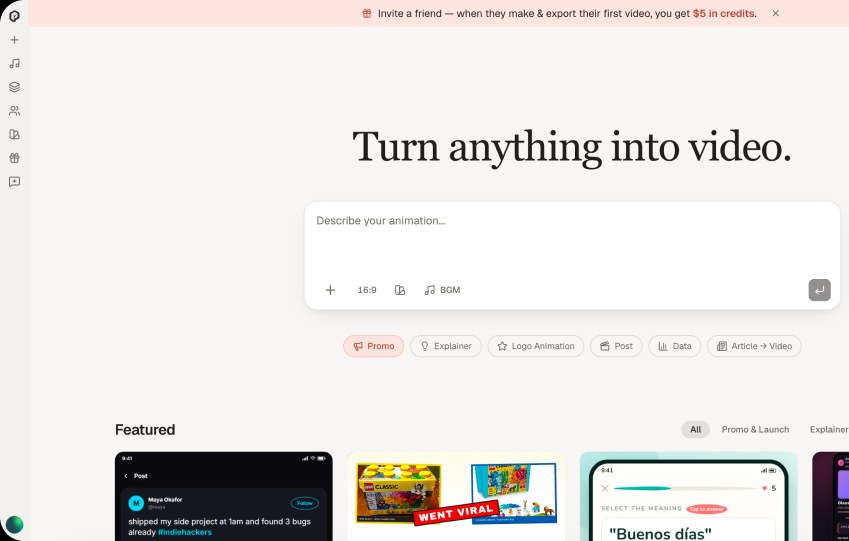
When the left navigation is collapsed, it only shows icons. There is no visible Projects / Recents entry that allows users to quickly access previously created work. To find an existing project, users need to expand the sidebar first.
Why it matters
Projects are the user’s accumulated work and an important part of the product’s ongoing workflow. Making them inaccessible from the collapsed navigation adds unnecessary friction, especially for returning users who want to continue or reuse an existing project.
Improvement
Keep Projects / Recents accessible even when the sidebar is collapsed. For example: add a dedicated Projects icon with a clear tooltip.
Business impact
Faster access to previous work can improve retention and repeat usage, encouraging users to return to existing projects instead of starting from scratch. It can also increase engagement with the product’s core creation workflow.
Executive summary
iArt.ai has a powerful AI creation engine, but the current experience introduces friction at three critical moments: generation, export, and returning to existing work. These issues can make the product feel less predictable and less efficient, particularly for users creating content repeatedly.
Key opportunities
- Build trust in AI creation — Make generation and refinement more transparent, predictable, and controllable.
- Make the path to export more predictable — Surface export capabilities and limitations earlier.
- Make returning to work effortless — Keep Projects and recent work accessible from the collapsed navigation.
Want this for your own product?
This is a short, self-directed teardown of a publicly available product. We picked iArt.ai ourselves to review — we weren't hired to audit it, and it isn't a client of ours. A commissioned UX audit goes further: it's scoped to your product's own goals and flows, not just what's visible to an outside visitor.
Want the same kind of review for your own product? See our website UX audit page for what's included, or browse more examples to see other teardowns.