

Loova UX Audit: Too Many Options, No Clear First Step
This is a short, self-directed teardown of Loova — a publicly available product we picked ourselves, not a commissioned client audit.
Loova is a web AI creative-content suite spanning AI Video, AI Image, Infinite Canvas, AI Avatar and Ads Studio, generating video, image and character content from a single dashboard.
Onix scoped this teardown as a “Growth UX Audit,” and framed it around one line from the report: “Loova offers a broad AI creative toolkit, but the current experience can feel visually and functionally overwhelming.” The three findings below appear in the order the report presented them.
Problem 01
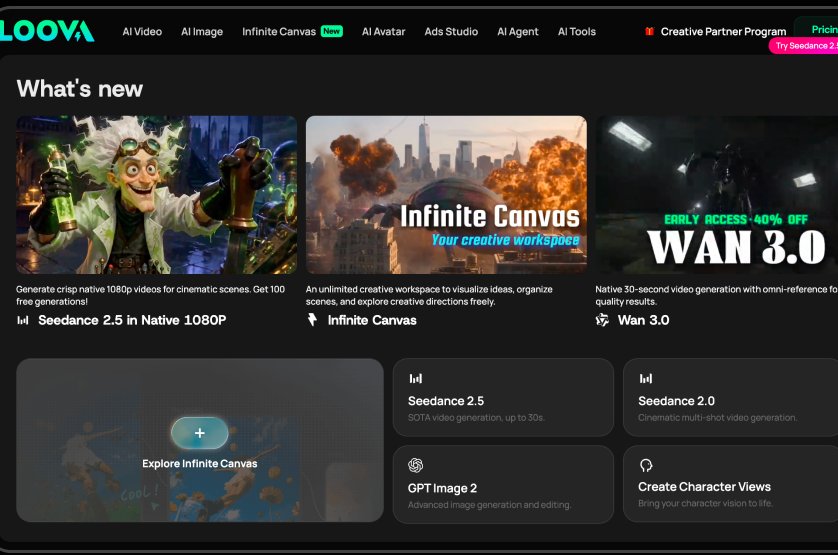
The homepage presents multiple tools, capabilities, models, and creative options at the same time. As a result, there is no clear primary focal point or obvious next step for a new user.
Why it matters
Users need to process too much information before understanding what Loova can do and where they should start. This increases cognitive load at the very first interaction with the product.
Improvement
Establish a stronger hierarchy around the primary user action. Reduce competing content in the hero section and organize secondary capabilities into clearer categories or progressive discovery.
Business impact
A clearer entry point could reduce friction between landing and first generation, potentially improving activation and increasing the number of users who reach the core product experience.
Problem 02
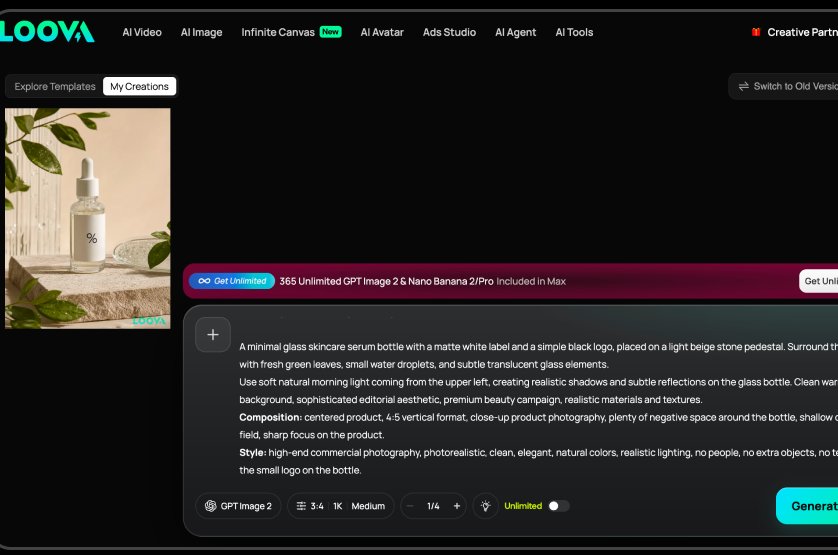
After generation, the prompt/input area occupies more visual space than the generated image itself. The interface therefore gives greater prominence to creating content than to evaluating the content that was just created.
Why it matters
The generated image is the primary outcome users came to see, yet it becomes visually secondary. This weakens the sense of completion and makes the next creative action less obvious.
Improvement
After a result is generated, shift the visual hierarchy toward the output. Give the image more space and make relevant next actions - such as Edit, Create Variation, Animate, or Download - more prominent.
Business impact
Giving successful outputs more prominence could encourage users to review, iterate, edit, and generate additional content, potentially increasing session depth and overall credit usage.
Problem 03
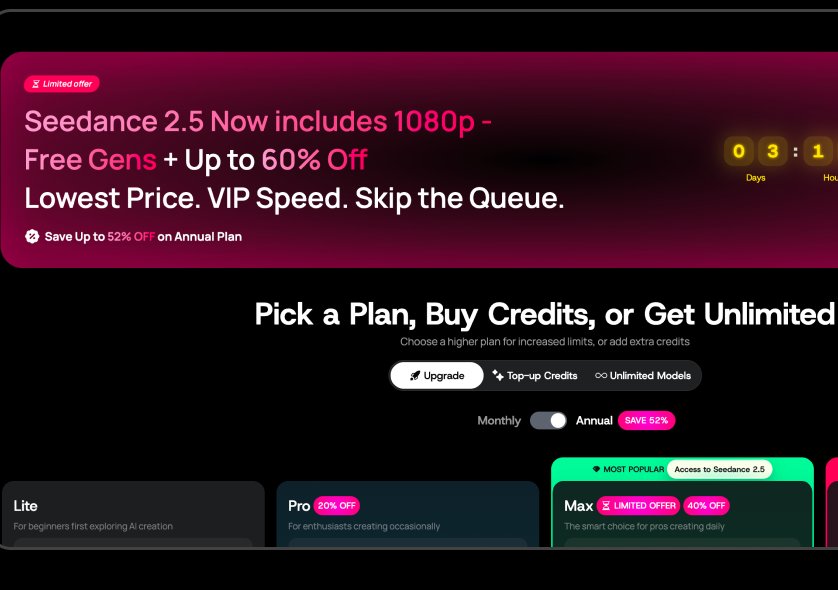
When users run out of credits, the upgrade modal dedicates a large portion of the available space to promotional content, while the actual decision of how to continue is secondary.
Why it matters
Users encounter the modal at a moment when they already have a clear intention to create something. Excessive promotional content adds cognitive load instead of helping them quickly understand the available options.
Improvement
Make the modal more action-oriented: clearly explain why the user is blocked, what they can purchase, how many generations they receive, and the primary action to continue. Reduce promotional content and prioritize the value proposition and decision.
Business impact
A more focused upgrade experience could make the value of purchasing credits easier to understand and reduce friction at the conversion point, potentially improving upgrade and purchase completion rates.
Executive summary
Loova offers a broad AI creative toolkit, but the current experience can feel visually and functionally overwhelming. The main friction appears across three key moments: discovering where to start, evaluating the generated result, and deciding whether to upgrade.
Key opportunities
- Create a clearer entry point — Reduce visual competition on the homepage and establish a stronger primary path toward the first generation.
- Prioritize generated results — Give outputs more space and make next actions clearer.
- Simplify the upgrade flow — Focus the upgrade experience on value and conversion.
Want this for your own product?
This is a short, self-directed teardown of a publicly available product. We picked Loova ourselves to review — we weren't hired to audit it, and it isn't a client of ours. A commissioned UX audit goes further: it's scoped to your product's own goals and flows, not just what's visible to an outside visitor.
Want the same kind of review for your own product? See our website UX audit page for what's included, or browse more examples to see other teardowns.