

Podcastor UX Audit: An Unclear Workflow and Hidden Costs
This is a short, self-directed teardown of Podcastor — a publicly available product we picked ourselves, not a commissioned client audit.
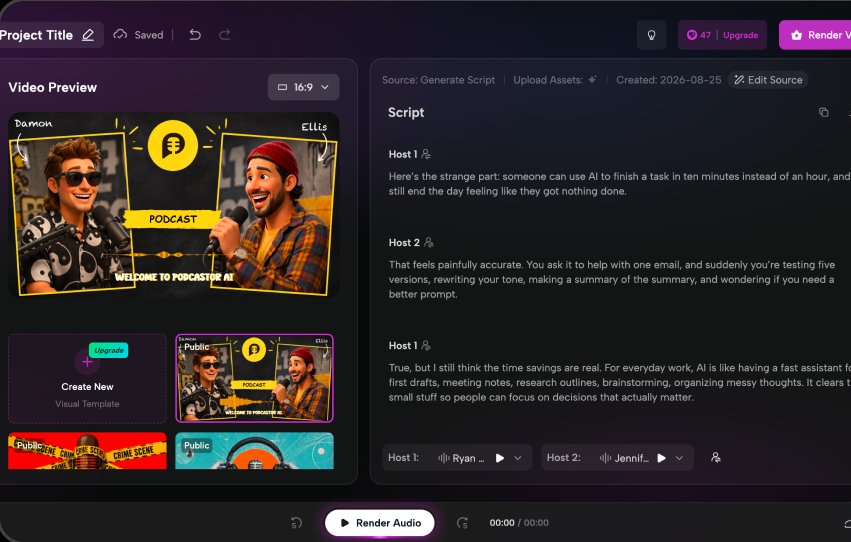
Podcastor is a web AI studio for creating video podcasts, combining script generation, voice selection, audio rendering, visual setup and video rendering in one workspace.
Onix scoped this as a “Growth UX Audit,” built around a line the report itself used to frame the problem: “PodcastorAI offers a flexible AI-powered video podcast creation experience, but the current workflow introduces friction around understanding the creation process and managing generation costs.” The two findings below follow the report’s own order.
Problem 01
The Studio combines script generation, voice selection, audio rendering, visual setup, and video rendering within the same workspace, but does not clearly communicate the sequence between these steps or the user’s current progress.
Why it matters
Users may struggle to understand what needs to be completed next or which actions are required before rendering the final video. This increases cognitive load and can make the creation process feel more complex than it actually is.
Improvement
Introduce a lightweight workflow indicator that communicates the main creation stages and their status, for example: Script → Voices → Audio → Visual → Video Keep the Studio flexible, but provide a clear current step, completed states, and recommended next action.
Business impact
A clearer workflow could reduce friction during the core creation experience and help more users successfully reach their first completed video, potentially improving activation and time-to-value.
Problem 02
Credit consumption is visible through the remaining balance, but the estimated cost of actions such as rendering audio or video is not clearly communicated directly within the primary action.
Why it matters
Users cannot easily predict the cost of an action before committing. This creates uncertainty around experimentation and makes it harder to understand the relationship between product usage and available credits.

Improvement
Show the estimated credit cost directly next to generation actions, for example: Render Audio - 3 credits. For higher-cost operations, show the estimated cost and remaining balance before confirming the render.
Business impact
Greater pricing transparency could increase trust in the credit system and reduce hesitation around generation, while making the product’s monetization model easier to understand.
Executive summary
PodcastorAI offers a flexible AI-powered video podcast creation experience, but the current workflow introduces friction around understanding the creation process and managing generation costs. Unclear progression between creation stages and limited upfront credit visibility can make the experience less predictable and increase hesitation around key generation actions.
Key opportunities
- Clarify the creation workflow — Introduce clear progression between Script, Voices, Audio, Visual, and Video so users always understand their current stage and next action.
- Improve credit cost transparency — Show estimated credit costs before generation to help users understand the cost of each action and make rendering decisions with greater confidence.
Want this for your own product?
This is a short, self-directed teardown of a publicly available product. We picked Podcastor ourselves to review — we weren't hired to audit it, and it isn't a client of ours. A commissioned UX audit goes further: it's scoped to your product's own goals and flows, not just what's visible to an outside visitor.
Want the same kind of review for your own product? See our website UX audit page for what's included, or browse more examples to see other teardowns.