

Simply UX Audit: A Paywall Before Any Personalized Value
This is a short, self-directed teardown of Simply — a publicly available product we picked ourselves, not a commissioned client audit.
Simply is a mobile health app: onboarding asks new users to pick personal goals, then presents a plan and daily tips, with paid access starting at $27.99/month after a 7-day free trial.
Onix tagged this teardown a “Growth & Trust UX Audit,” drawing on a single line the report used to make its point: “Aligning Monetization with Value Delivery.” Two findings follow below, in the sequence the report presented them.
Problem 01
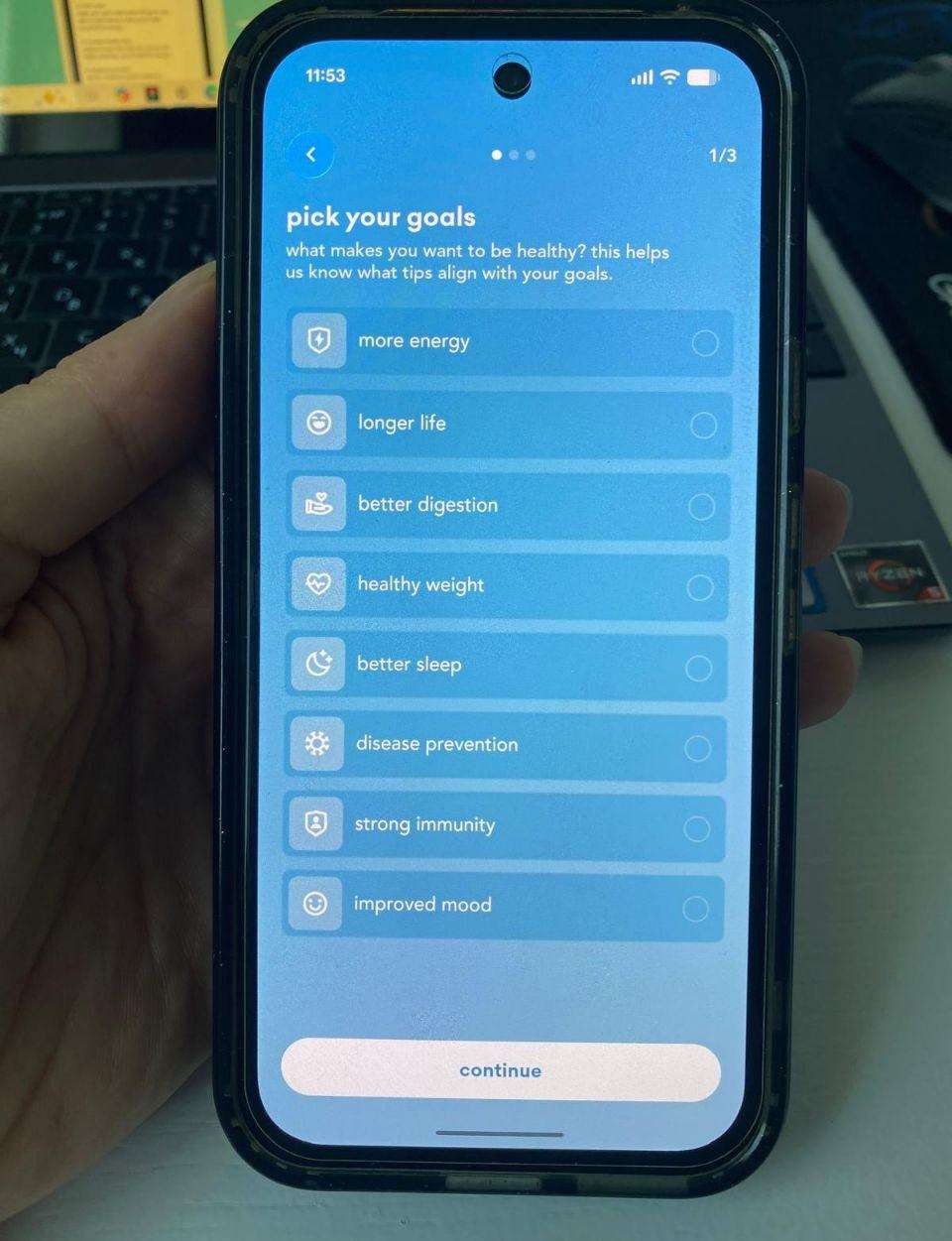
In the default state, option icons and unselected radio indicators are rendered in low-contrast, pale tones directly against the blue gradient background, only once an option is tapped does it become clearly visible, filled in white.
Why it matters
Users need to read and compare all available options before choosing one. If the unselected state is hard to see, users can’t scan the list efficiently and may miss options entirely, the interface only becomes legible after a choice is already made, which is the wrong order for a decision screen.
Improvement
Establish accessible contrast ratios for all interactive states (selected, unselected, icons) as part of a defined design system, tested against WCAG AA standards.
Business impact
- Fewer missed or overlooked options during onboarding
- More confident, deliberate goal selection (better input data for personalization downstream)
- Meets accessibility contrast standards in the state that matters most, before the user acts
Problem 02
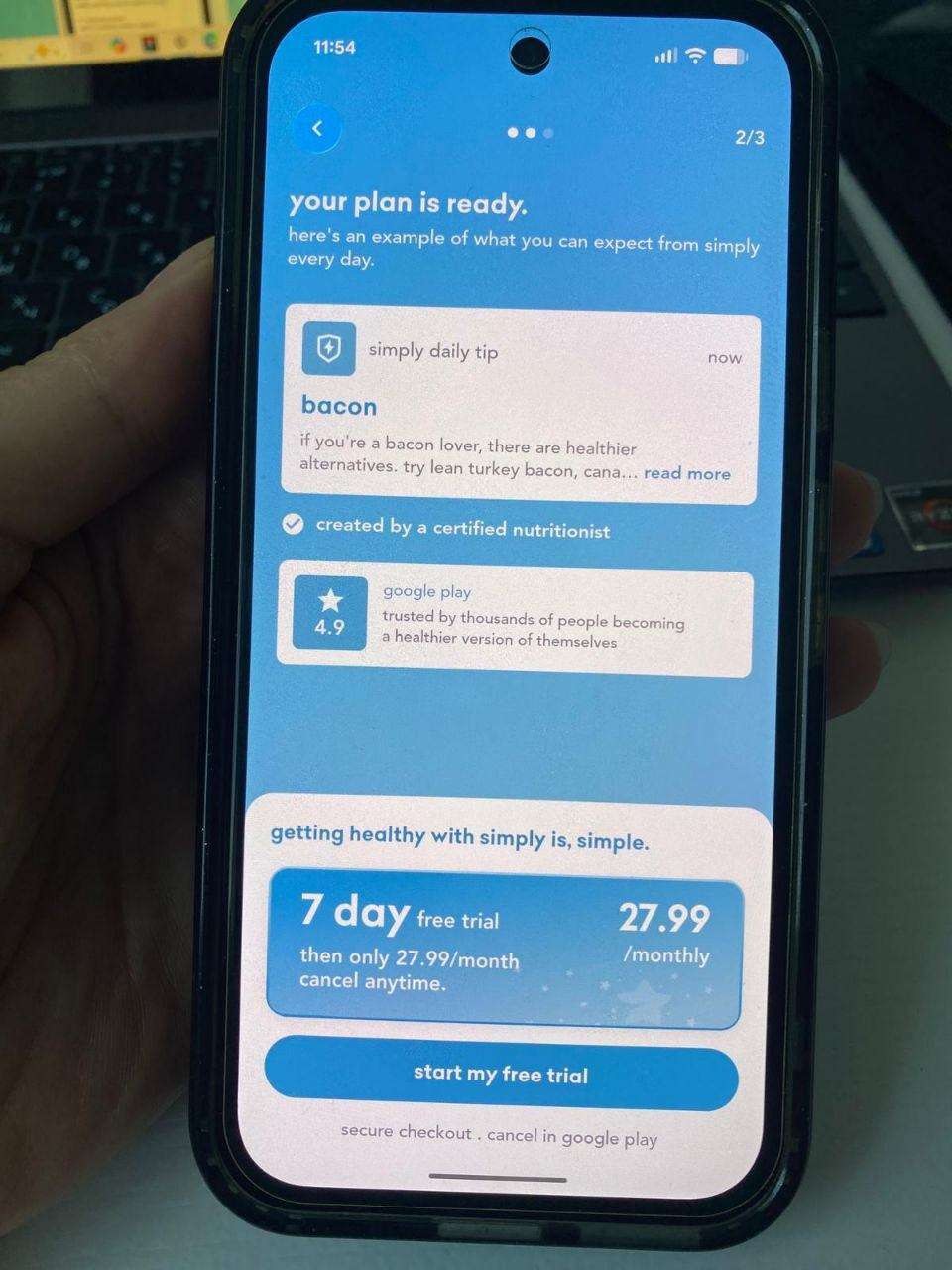
The subscription paywall appears at step 2 of 3 in onboarding, before the user has experienced any personalized plan, real content, or product functionality. The “plan” shown is a generic example tip, not a result of the user’s own input.
Why it matters
Asking for a financial commitment before demonstrating personalized value forces users to trust the brand’s promise rather than their own experience. In a competitive health-app category, this is where trial conversion is won or lost, and premature monetization typically depresses it.
Improvement
Move the paywall after a genuine “aha” moment. For example, after the user’s actual goals generate a visibly personalized plan, or after their first real interaction with core content.
Business impact
- Stronger perceived value at the point of payment
- Higher trial-to-paid conversion
- Fewer refund requests and chargebacks driven by “I didn’t get what I expected”
Executive summary
Simply has a clear, well-scoped value proposition, but the current onboarding asks users to trust and pay before they experience it, and does so with interface and messaging choices that introduce real accessibility and compliance risk alongside the UX cost.
Key opportunities
- Build on accessible foundations — Fix contrast and legibility issues to meet accessibility standards and reduce risk.
- Replace persuasion with proof — Give pricing full transparency and ground trust claims in substantiated, compliant messaging.
- Earn the paywall — Move monetization after a genuine personalized value moment, not before it.
Want this for your own product?
This is a short, self-directed teardown of a publicly available product. We picked Simply ourselves to review — we weren't hired to audit it, and it isn't a client of ours. A commissioned UX audit goes further: it's scoped to your product's own goals and flows, not just what's visible to an outside visitor.
Want the same kind of review for your own product? See our mobile app UX audit page for what's included, or browse more examples to see other teardowns.