

Truvoca UX Audit: Clear Proof, Unclear Product Readiness
This is a short, self-directed teardown of Truvoca — a publicly available product we picked ourselves, not a commissioned client audit.
Truvoca is a phone-first AI agent platform for service-business call workflows. Its public website positions the product around a useful, concrete promise: the call should end with a recorded outcome and a clear next action, not just a transcript.
The site does several things well. The visual system is distinctive and consistent, the main headline is memorable, and the synthetic call record makes an abstract AI product feel tangible. The three findings below focus on places where the experience makes prospects work harder than necessary to understand what is available and take the next step.
Problem 01
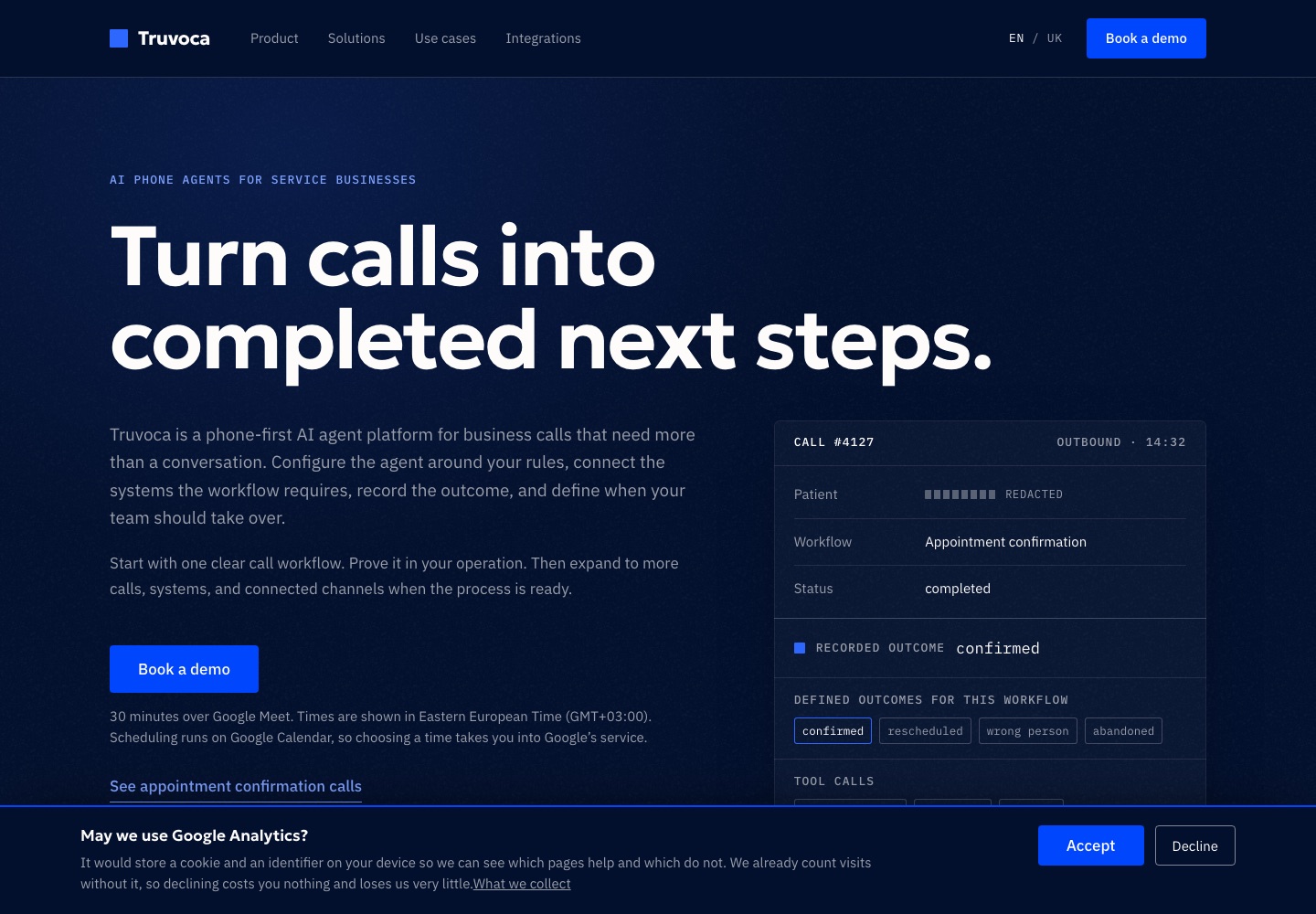
The hero has a strong headline and relevant product proof, but the conversion path is surrounded by too much explanatory copy. Before reaching the primary action, a visitor has to process the platform description, the rollout philosophy, a scheduling disclaimer, and a secondary use-case link.
Why it matters
The first screen should answer three questions quickly: what the product does, who it is for, and why the visitor should believe it. The current hero answers all three, but spreads the answer across several paragraphs and two competing paths. This weakens the otherwise excellent headline and makes the demo CTA feel like one item in a document rather than the obvious next step.
Improvement
Keep the headline and call record, but reduce the supporting copy to one short value statement. Move the Google Meet, timezone, and Google Calendar details into the scheduling dialog, where they become relevant. Keep one secondary proof link, visually quieter than the primary CTA.
Business impact
A faster first-screen read should help more qualified visitors understand the offer before they scroll, improving demo intent without changing the underlying positioning.
Problem 02
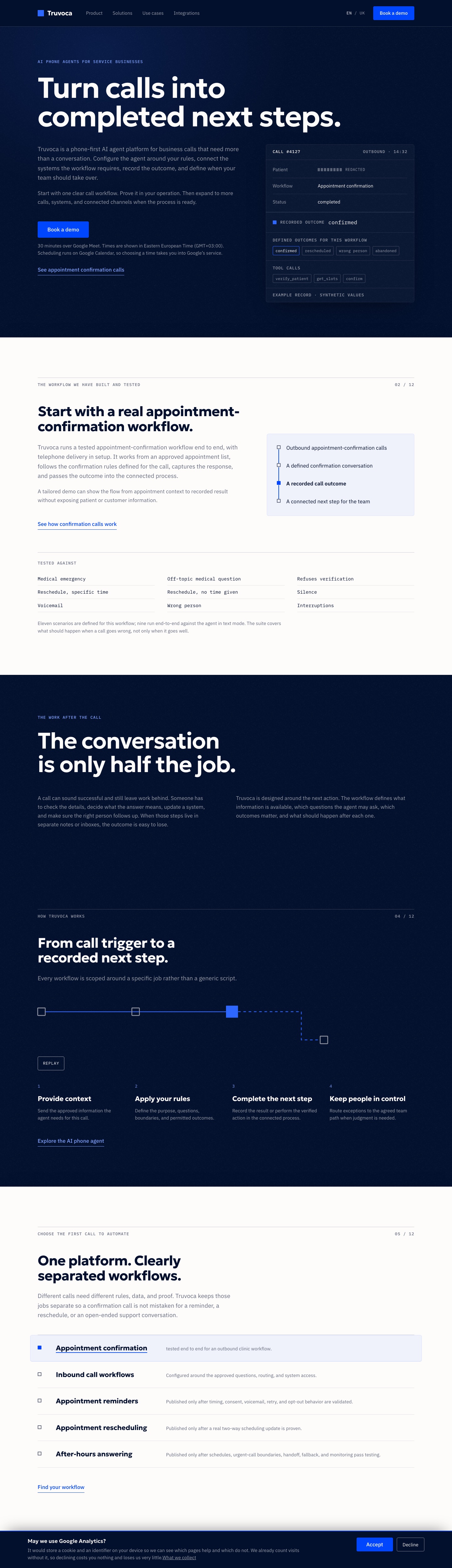
The workflow catalogue mixes three different levels of readiness in one visually uniform list: appointment confirmation is tested end to end, inbound workflows are configurable, and several other workflows are described as something that will only be published after validation. Only the first item is linked, but that difference is subtle.
Why it matters
Prospects scanning the list may interpret every row as an available product capability, or may read the unlinked rows as broken navigation. The copy is careful and honest, but the interface does not turn that nuance into a clear status model. This creates uncertainty precisely where a buyer is trying to decide whether Truvoca fits their use case.
Improvement
Add explicit status labels such as Available now, Custom setup, and In validation. Separate proven workflows from upcoming ones, and give each available or configurable row a clear action: see the workflow, request a scoped demo, or join an update list.
Business impact
Clear readiness labels can reduce pre-sales ambiguity, set more accurate expectations, and route visitors into a demo that matches what the team can actually deliver today.
Problem 03
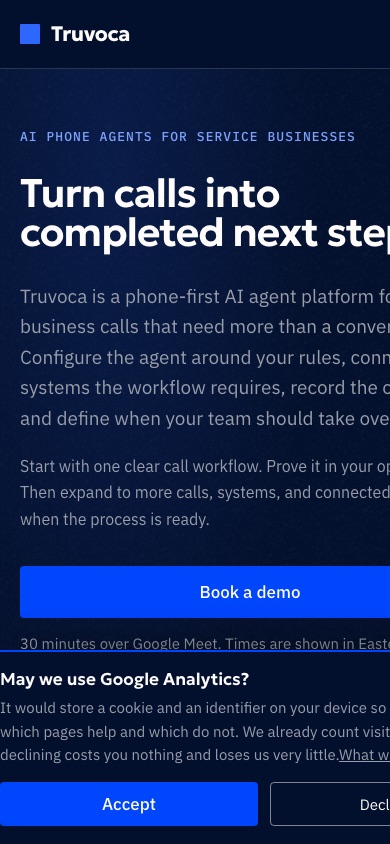
At a narrow mobile viewport, the hero content extends beyond the right edge of the screen. The headline and paragraphs are clipped rather than wrapping inside the viewport, and the cookie banner’s action row also overflows horizontally. The banner covers a large part of the first screen while the page itself cannot be read without sideways movement.
Why it matters
This is a blocking mobile usability issue, not a visual preference. Visitors can miss words in the core value proposition, cannot see the complete secondary consent action, and may assume the site is broken before they reach the product proof. It also creates an accessibility barrier for people using zoom or smaller screens.
Improvement
Test the layout at 320, 360, and 390 CSS pixels. Remove the source of horizontal overflow, ensure
all hero columns and controls use max-width: 100%, and allow long text to wrap normally. Stack
the cookie actions on the narrowest screens and reduce the banner copy so both choices remain
fully visible without covering the primary CTA.
Business impact
Fixing the mobile overflow protects the highest-intent path on smaller devices and prevents an avoidable first-impression failure before prospects can evaluate the product.
Executive summary
Truvoca already has a credible product story, a disciplined visual language, and unusually honest copy about what has and has not been validated. The biggest opportunity is to make that honesty easier to scan: shorten the hero, translate workflow readiness into explicit interface states, and repair the narrow-screen layout.
Key opportunities
- Compress the hero around one decision — Keep the memorable promise and proof, but move scheduling details out of the first-screen conversion path.
- Make capability readiness explicit — Label what is proven, configurable, and still being validated instead of relying on subtle wording and link states.
- Treat mobile overflow as a release blocker — Ensure the hero and cookie controls remain fully readable and actionable at common narrow widths.
Want this for your own product?
This is a short, self-directed teardown of a publicly available product. We picked Truvoca ourselves to review — we weren't hired to audit it, and it isn't a client of ours. A commissioned UX audit goes further: it's scoped to your product's own goals and flows, not just what's visible to an outside visitor.
Want the same kind of review for your own product? See our website UX audit page for what's included, or browse more examples to see other teardowns.