

Vaani UX Audit: Cost and Locks With No Explanation
This is a short, self-directed teardown of Vaani — a publicly available product we picked ourselves, not a commissioned client audit.
Vaani is a mobile AI dubbing app: pick a target language, isolate and clone the speakers’ voices, generate a lip-synced dub, and export it, all billed from a single coin wallet.
Onix’s scope for this one was a “Trust & Conversion UX Audit,” rooted in a single line from the report: “Making Cost and Control Transparent Before Commitment.” The three findings below appear in the report’s own order.
Problem 01
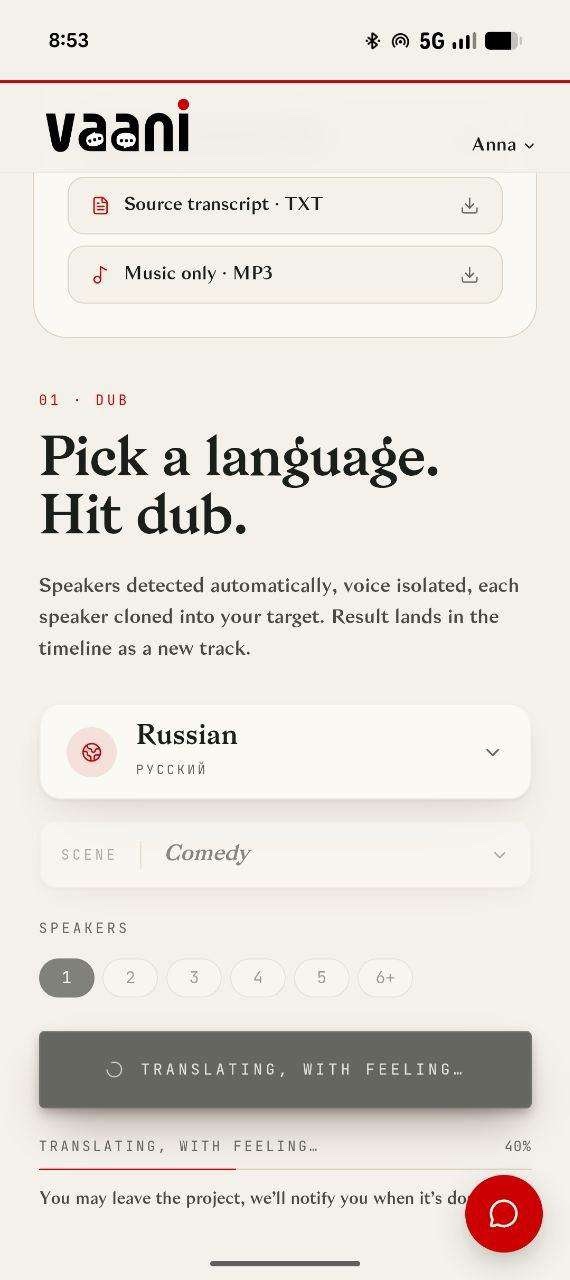
Output downloads (transcript, music-only track) are positioned above the primary “pick a language, hit dub” action on the page — the results of the task appear before the task itself in the visual flow.
Why it matters
Interface order should mirror task order. When outputs are shown before the action that creates them, new users lose a clear sense of “what do I do first,” adding unnecessary cognitive load to an otherwise straightforward core action.
Improvement
Reorder the page so the primary action (language selection, dub trigger) leads, with outputs and downloads appearing below or only once available.
Business impact
- Clearer first-time user flow, faster task completion
- Reduces onboarding confusion for new accounts
- Reinforces the product’s core action as the obvious next step
Problem 02
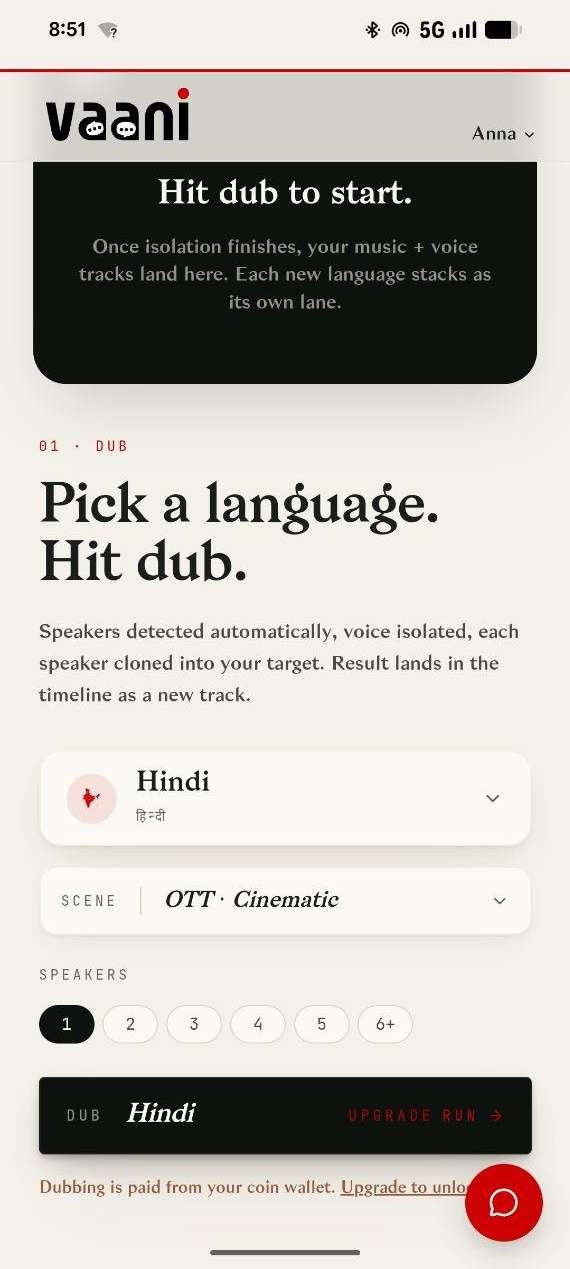
Pricing exists on the website’s pricing page, but isn’t referenced in-product at the point of configuration or use.
Why it matters
Even during a free trial, users build their expectation of the paid product from what they see in-flow. If cost information only lives on a separate marketing page, users configuring and running a job have no way to connect their in-progress action to what it will cost once the trial ends.
Improvement
Surface a lightweight cost or credit-usage indicator at the point of configuration, with a direct link to the pricing page, so trial users can see what a given run will cost before or as they run it, not only when the upgrade wall appears.
Business impact
- Connects the free trial experience to a clear path toward paid conversion
- Reduces trial users abandoning at the upgrade wall without context
- Builds trust in a usage-based model by making cost visible where decisions happen
Problem 03
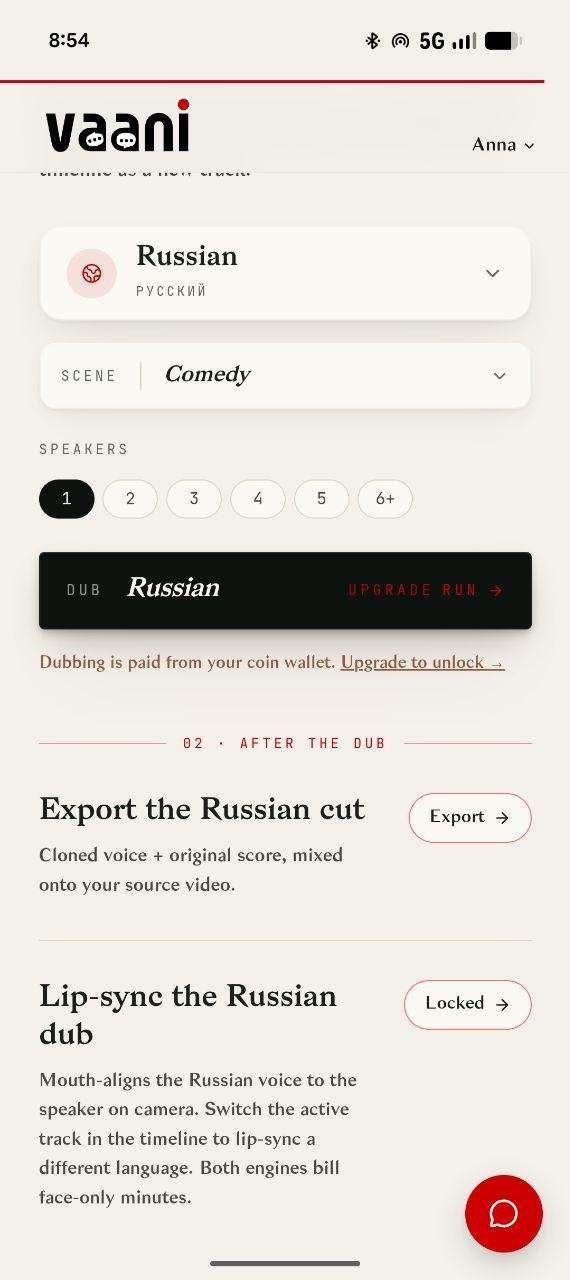
Locked features, like “Lip-sync the Russian dub,” display a “Locked” state with no inline explanation of what’s required to unlock them, and a persistent chat bubble overlaps interface content in the same corner across multiple screens.
Why it matters
An unexplained lock is a dead end, users can’t tell if they need to upgrade, earn more coins, or complete a prerequisite step, so many will simply disengage rather than investigate.
Improvement
Add a one-line explanation or tooltip on every locked state describing the unlock path, and reposition or make the support bubble collapsible so it never overlaps primary content.
Business impact
- Converts locked-feature curiosity into upgrade actions instead of drop-off
- Cleaner, more finished-feeling interface
- Removes a recurring, avoidable visual defect across the product
Executive summary
Vaani has a genuinely strong core product and a distinctive, well-designed brand identity. The gap is in how clearly it communicates cost, control, and next steps at the moments that matter most to the user’s decision to continue.
Key opportunities
- Disclose cost upfront — Show pricing before configuration and execution, not after.
- Clarify controls — Explain ambiguous settings and abstracted currency in real terms.
- Reorder for clarity — Lead with the primary action; show outputs only once they exist.
- Make locks actionable — Every locked feature should tell the user exactly how to unlock it.
Want this for your own product?
This is a short, self-directed teardown of a publicly available product. We picked Vaani ourselves to review — we weren't hired to audit it, and it isn't a client of ours. A commissioned UX audit goes further: it's scoped to your product's own goals and flows, not just what's visible to an outside visitor.
Want the same kind of review for your own product? See our mobile app UX audit page for what's included, or browse more examples to see other teardowns.